
Move Log
Move Log gives equipment managers a clear timeline of machine activity. Review telematics events, hours, idle time and fuel use in one place, then switch between detailed records, daily timelines and charts to understand how each machine was used.
One operational picture
What you get with goAardvark
Grid View
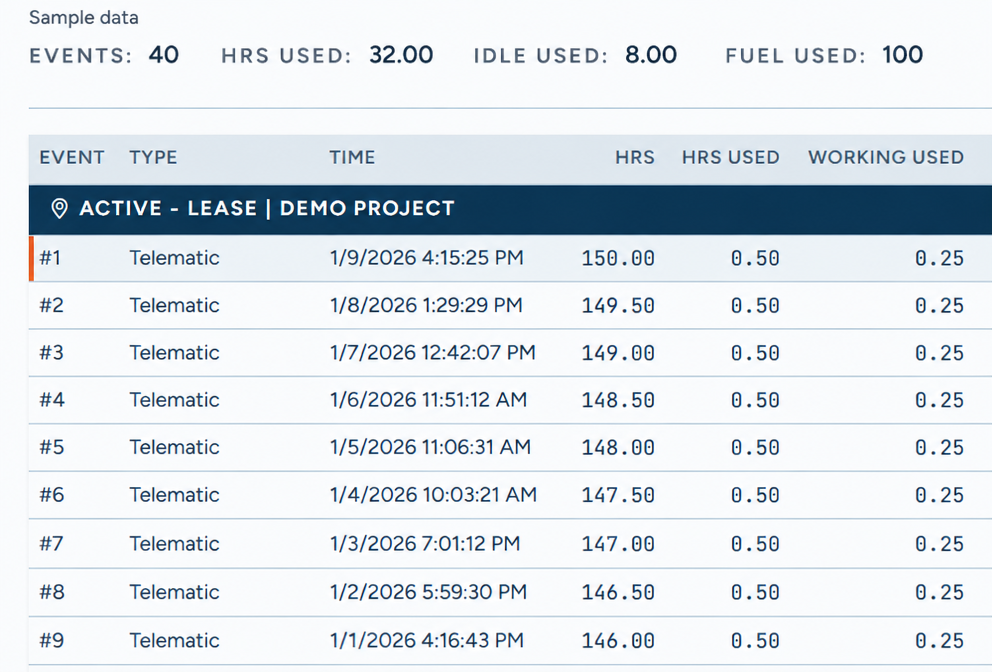
See the activity behind the totals. Grid View lists each telematics event with its timestamp, hour-meter reading, hours used and working hours used. Summary totals for events, hours, idle time and fuel keep the period in view, while job or lease context connects machine activity to the work.
Depth of data your team can rely on.
Grid View
Day View
See when a machine ran—and when it did not. Day View lays out running, down and no-data periods on a daily timeline, so you can compare activity across dates, spot irregular schedules and quickly identify days that need a closer look.
One shared record for everyone involved.
Day View
Chart
Turn fuel data into a trend you can scan. Chart plots fuel used over time, helping you compare activity across the week and spot sharp changes or unusual patterns that may warrant a closer look.
Traceable and audit-ready from day one.
Chart
Frequently asked questions
More features
All featuresKnow where your fleet stands before the day slips.
Book a demo to see how goAardvark fits your heavy-civil operation.