Inspections
Run inspections the same way across the whole fleet. Build templates with the fields your team actually checks, complete them in the field on the mobile app, and keep every result in one searchable history—so defects get flagged, high-severity issues stand out and nothing waits on a paper form.
One operational picture
What you get with goAardvark
Inspection History
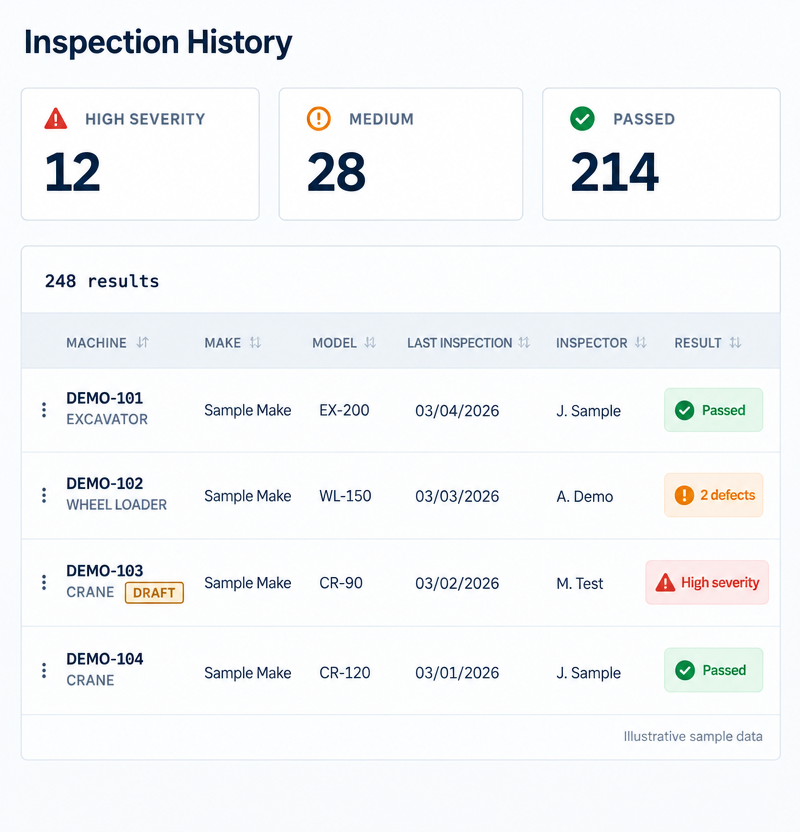
See every inspection across the fleet in one list. Severity counts sit above the results so high-severity findings are impossible to miss, and each row shows the machine, make, model, last inspection date, inspector and result. Sort and search by machine to review a unit's record before it goes back to work.
Depth of data your team can rely on.
Inspection History
Inspection Templates
Build inspections around how your crews actually work. Create a template per machine type or task and add custom fields—text, numbers, pass/fail, dropdowns, checklists, photos, dates and signatures. Mark fields as required, ask for a photo when an item fails and flag failures as high severity, so every inspection collects the right detail.
One shared record for everyone involved.
Inspection Templates
Inspection Mobile App
Put inspections in the hands of the people at the machine. Operators and mechanics search or scan for a machine, see when it was last inspected and start the right template from their phone. Results flow straight into Inspection History, so the office sees what the field found without retyping paper forms.
Traceable and audit-ready from day one.
Inspection Mobile App
Frequently asked questions
More features
All featuresKnow where your fleet stands before the day slips.
Book a demo to see how goAardvark fits your heavy-civil operation.