
Reporting
Turn fleet records into information your team can use. Reporting brings inventory, inactivity and costing reports together, with subscription schedules and criteria that help you get the right report. Export CSV data for further analysis in your own spreadsheet, visualization or AI tools.
One operational picture
What you get with goAardvark
Extensive Reporting
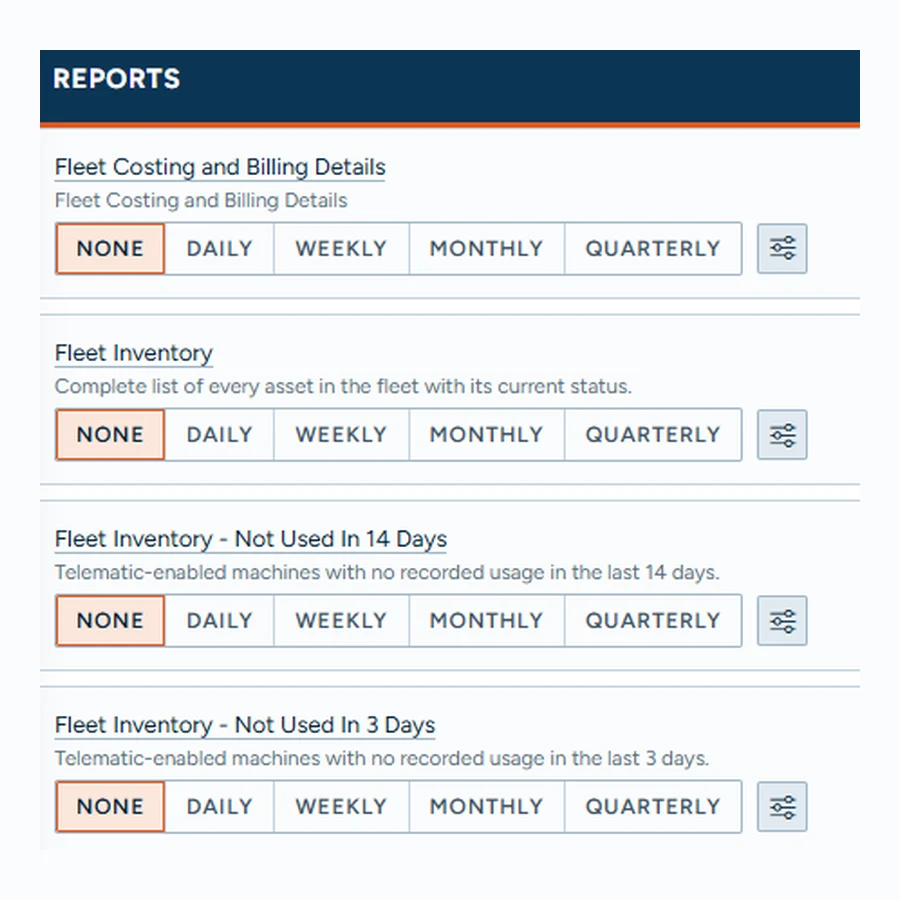
Review reports covering fleet costing and billing, fleet inventory and machines with no recorded usage in the last 3 or 14 days. Set the subscription cadence for each report to daily, weekly, monthly or quarterly, or leave it off when you do not need it.
Depth of data your team can rely on.
Extensive Reporting
Customized Reporting
Choose the subscription criteria for the report you need. For Fleet Costing and Billing Details, set billing start and end dates and choose an email subscription. Leave a date at its default to keep it current, or select a fixed date for a consistent reporting period. Subscription reports are emailed as Excel files.
One shared record for everyone involved.
Customized Reporting
AI-Ready
Use exported CSV reporting data as input for your own analysis and AI tools. Depending on the fields in your report, you could compare machine hours, chart idle time or explore patterns across the fleet. The pictured visualization uses fictional sample data to show what external analysis could look like; it is not a built-in goAardvark AI screen.
Traceable and audit-ready from day one.
AI-Ready
Frequently asked questions
More features
All featuresKnow where your fleet stands before the day slips.
Book a demo to see how goAardvark fits your heavy-civil operation.